Unlock your Roblox potential and create amazing games! This comprehensive guide to how to script Roblox is tailored for busy US gamers who want to add a new dimension to their favorite platform. Learn the fundamentals of Lua scripting, understand the Roblox Studio interface, and discover how to build interactive experiences from scratch. We break down complex concepts into easy-to-follow steps, perfect for balancing your passion for gaming with life's other demands. Whether you dream of crafting unique game mechanics, personalizing your creations, or just understanding the magic behind your favorite Roblox experiences, this article provides the essential navigational tools and informational insights you need. Dive into the world of Roblox scripting and transform from player to creator, enhancing your skill set and finding new ways to enjoy the vibrant Roblox community. Discover practical tips for efficient learning and common pitfalls to avoid, ensuring a smooth and rewarding journey into game development on Roblox.
What is the absolute easiest way to start scripting in Roblox Studio for a busy adult gamer?
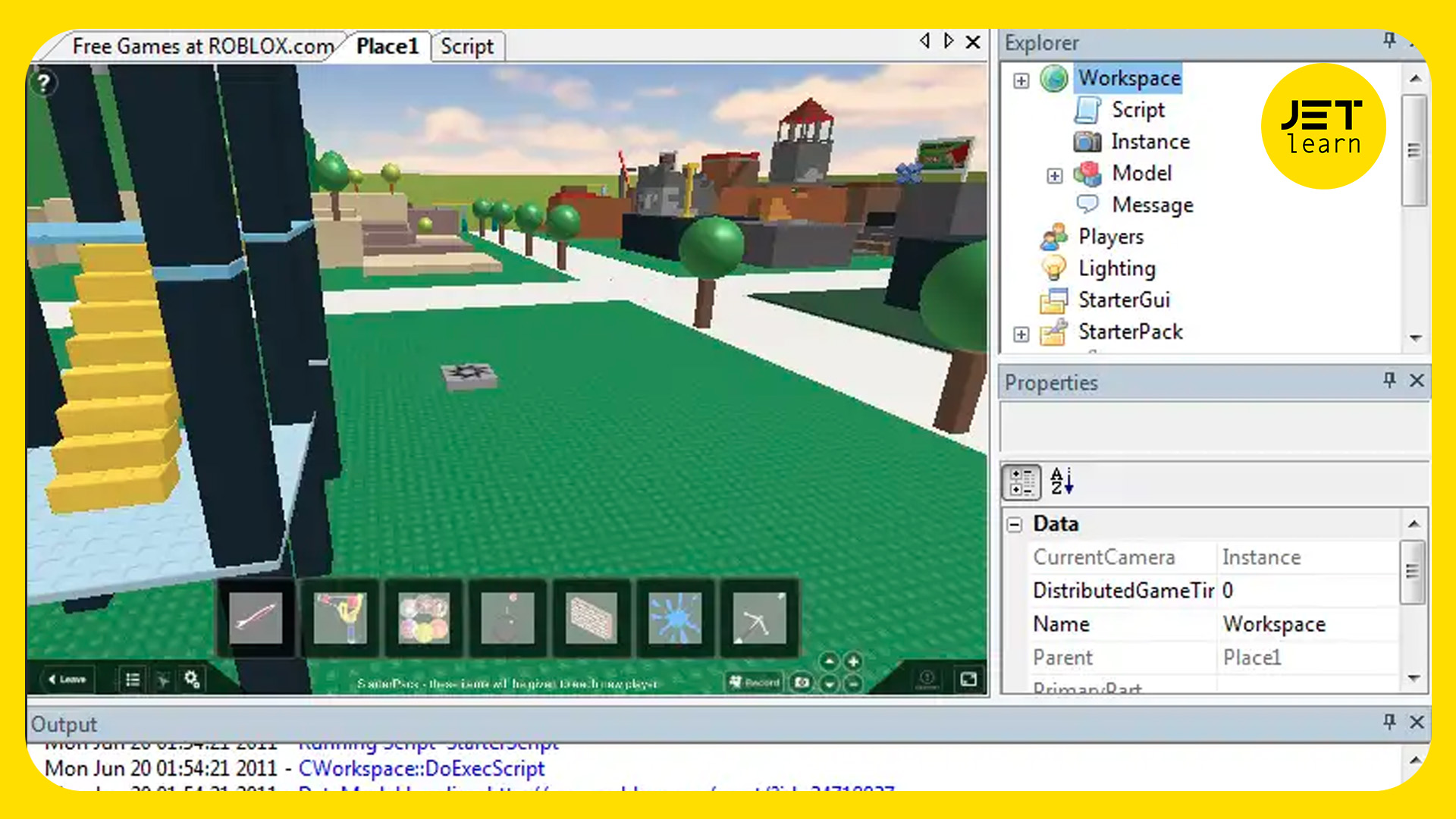
The easiest way to begin scripting in Roblox Studio is to first download the free Roblox Studio application. Then, open a 'Baseplate' template. Locate the Explorer window, right-click on 'Workspace', and insert a 'Script'. Your first step is often just typing 'print("Hello World!")' inside and hitting play. Focus on simple, single-task scripts using the official Roblox Creator Hub tutorials, which are designed for step-by-step learning. Dedicate 15-30 minutes when you can, learning one command at a time, like making a part change color or creating a simple button click. It's about small, consistent progress.
Why is Lua the chosen language for Roblox scripting, and how does it benefit new developers?
Lua is the chosen language for Roblox scripting primarily because it is lightweight, fast, and renowned for its simplicity and ease of learning. For new developers, especially busy adults, this is a huge benefit as it significantly lowers the barrier to entry into game development. Its straightforward syntax reduces complexity, allowing you to grasp core programming concepts like variables, loops, and functions quickly. This means less time struggling with intricate language rules and more time actually building and seeing your ideas come to life in Roblox.
How can I ensure my scripted Roblox game runs smoothly on different devices, especially mobile?
To ensure your scripted Roblox game runs smoothly across devices, especially mobile, prioritize efficiency in your code. Minimize unnecessary loops and calculations, use `local` variables, and debounce rapidly firing events to prevent performance bottlenecks. Crucially, offload visual effects and player-specific inputs to client-side scripts, reserving server-side scripts for essential game logic and security. Regularly test your game on various hardware, including mobile, and monitor the in-game performance statistics to identify and address any lag or slowdowns. Optimize assets like meshes and textures, too.
What are the immediate benefits of learning 'how to script Roblox' for someone who primarily plays games?
Learning how to script Roblox offers immediate benefits beyond just playing: it transforms you from a consumer into a creator. You gain the power to customize your gaming experience, build unique worlds, and implement game mechanics you've always dreamed of. This skill enhances problem-solving abilities, sparks creativity, and provides a deeper understanding of game design. Moreover, it opens doors to collaborating with other developers, fostering social connections, and even potentially earning Robux, turning your passion into a productive hobby.
Where can I find reliable, up-to-date resources for learning advanced Roblox scripting techniques?
For reliable, up-to-date advanced Roblox scripting techniques, the official Roblox Creator Hub is your primary resource, offering comprehensive documentation and tutorials. Beyond that, the Roblox Developer Forum is an invaluable community hub for asking questions and finding solutions from experienced developers. YouTube channels by established Roblox creators (e.g., AlvinBlox, TheDevKing) often provide in-depth video tutorials. Finally, exploring open-source scripts in the Roblox library and analyzing how they work can offer practical insights into complex mechanics.
Is it possible to integrate external APIs or web services into my Roblox scripts?
Yes, it is possible to integrate external APIs or web services into your Roblox scripts, but with important considerations. Roblox provides the `HttpService` which allows server-side scripts to make HTTP requests to external servers. This enables functionalities like fetching data from external databases, integrating with Discord webhooks, or accessing other web-based services. However, due to security and performance concerns, `HttpService` is disabled by default and must be explicitly enabled in your game's settings. Client-side HTTP requests are generally not permitted for security reasons, so all external API interactions should be handled on the server.
What are some common security best practices to implement in Roblox scripts to prevent exploits?
Common security best practices in Roblox scripts focus on preventing client-side exploits. Never trust the client: always validate any information or actions originating from a player's device on the server. For example, if a player's script tells the server they collected an item, the server should verify if the player was actually near the item and if the item existed. Implement strong anti-cheat checks for actions like movement speed or jump height. Use `RemoteEvents` and `RemoteFunctions` for secure communication between client and server, ensuring all critical game logic and data storage happens server-side, out of reach from client manipulation.
Are you one of the millions of US gamers, often juggling work, family, and a precious few hours for digital adventures, who has ever wondered about the magic behind your favorite Roblox games? Perhaps you've thought, "I wish I could make that character jump higher," or "What if I could build my own mini-game?" If so, you're not alone. The allure of creating within the games we love is strong, and for the average gamer, around 36 years old and dedicating 10+ hours a week to their passion, diving into something new like scripting can seem daunting. But imagine transforming your gameplay into a creative outlet, building skills, and even sharing your unique visions with friends in the vast Roblox universe. This month, with 87% of US gamers regularly engaging and mobile gaming continuing its dominance, learning how to script Roblox is more accessible and rewarding than ever. It's not just about complex coding; it's about problem-solving, expressing creativity, and enhancing your overall gaming experience.
This guide is crafted specifically for you – the busy, value-conscious gamer looking for practical solutions, not hype. We'll demystify how to script Roblox, offering clear, actionable steps that respect your limited time. Forget endless tutorials; we’ll focus on the core concepts you need to start building, troubleshooting, and even optimizing your creations. We’ll address common pain points like getting started without feeling overwhelmed, understanding performance implications for smoother play, and finding resources that fit your budget and lifestyle. By the end, you’ll have a solid foundation to turn your Roblox game ideas into reality, connect with others, and add a valuable new skill to your gaming repertoire. Let’s unlock the power of creation together.
What Exactly Is Roblox Scripting And Why Should I Learn It?
Roblox scripting involves writing code, primarily using a language called Lua, within Roblox Studio to bring your game worlds to life. It's the engine that makes characters move, objects interact, and game rules function. Think of it as giving instructions to your Roblox creations. You might be wondering, with limited gaming time, why add another skill? Learning how to script Roblox offers immense benefits beyond just playing. It transforms you from a consumer into a creator, opening up new avenues for fun, skill-building, and social interaction. For gamers who enjoy problem-solving and expressing creativity, it's a deeply satisfying endeavor. Plus, understanding the basics can enhance your appreciation for the games you already love.
Moreover, scripting teaches valuable computational thinking skills that are useful far beyond Roblox, such as logic, debugging, and project management. It's a fantastic way to engage with the platform on a deeper level, connecting with a community of fellow creators and potentially even earning Robux through successful game development. Given the rise of social gaming trends and the influence of creators, scripting offers a unique blend of personal development and community engagement. It’s an investment in your gaming passion that pays dividends in creativity and understanding.
How Do I Get Started With Roblox Studio And Lua Scripting?
Getting started with Roblox scripting is surprisingly straightforward, especially for those familiar with installing games or navigating software. The first step is to download and install Roblox Studio, which is a free application available directly from the Roblox website. Once installed, log in with your Roblox account, and you'll be greeted by an interface designed for creation. Think of Roblox Studio as your digital workshop. Lua, the programming language Roblox uses, is known for its simplicity and ease of learning, making it ideal for beginners. You don't need prior coding experience to begin your journey.
Within Studio, you'll find templates to kickstart your projects, like a baseplate or a pre-built town. The key is to get comfortable with the interface: the Explorer window (showing all objects in your game), the Properties window (where you customize objects), and the Output window (where scripts display messages and errors). Your first script might be as simple as making a part change color or creating a simple click detector. Many gamers find it helpful to follow along with beginner tutorials, often found on YouTube or the official Roblox Creator Hub, which guide you through these initial steps hands-on. Start small, experiment, and don't be afraid to make mistakes – that's how you learn.
What Are The Essential Lua Scripting Concepts For Roblox Developers?
To effectively script in Roblox, understanding a few core Lua concepts is crucial. These are the building blocks that will allow you to create dynamic and interactive experiences. Here are the essentials:
- Variables: These are containers for storing data. For example,
local playerHealth = 100stores a number. - Data Types: Lua handles various types of data, including numbers (integers, decimals), strings (text), booleans (true/false), tables (collections of data), and functions (blocks of code).
- Operators: These perform operations on values. Think arithmetic operators (+, -, *, /), comparison operators (==, >, <), and logical operators (and, or, not).
- Conditional Statements (if/then/else): These allow your code to make decisions. For instance,
if playerHealth <= 0 then playerDied() end. - Loops (for, while): Used to repeat actions multiple times. A
forloop might iterate through a list of items, while awhileloop continues as long as a condition is true. - Functions: Reusable blocks of code that perform a specific task. You define them once and can call them whenever needed, like
local function healPlayer(player) player.Health = 100 end. - Events: Roblox objects can trigger events (e.g., a part being touched, a player clicking a button). You connect functions to these events to make your game react, such as
part.Touched:Connect(onPartTouched).
Mastering these concepts provides a robust foundation for building virtually any game mechanic. They are the language through which you communicate your game's logic and behavior to the Roblox engine.
How Can I Make My Roblox Scripts More Efficient And Performant?
For gamers balancing busy lives, performance isn't just about graphics; it's about a smooth, frustration-free experience. Efficient scripting is key to creating Roblox games that run well on various devices, from high-end PCs to mobile phones. This is especially relevant given mobile's dominance in the gaming landscape this month. Here are practical tips to boost script performance:
- Minimize Redundant Calculations: Don't calculate the same value multiple times if it doesn't change. Store it in a variable.
- Use
localVariables: Declaring variables aslocalimproves lookup speed and helps manage memory more efficiently than global variables. - Debounce Events: If an event (like a part being touched) fires rapidly, it can cause performance issues. Implement a "debounce" (a short cooldown) to prevent a script from running too frequently.
- Optimize Loops: Avoid infinite loops or loops that run for excessively long durations. If iterating through a table, stop the loop once you find what you need.
- Client-Side vs. Server-Side: Understand the difference. Generally, visual effects and player-specific interactions should be handled on the client (the player's device), while core game logic, saving data, and security should be server-side. This distributes the workload.
- Avoid Unnecessary
wait()Calls: Whiletask.wait()is better, usingwait()too often or for very short durations can unnecessarily pause script execution and be inefficient. Use it only when truly needed for timing. - Clean Up Unused Objects: If you dynamically create objects (parts, effects), ensure they are destroyed using
:Destroy()when no longer needed to free up memory.
By applying these techniques, you'll create a more enjoyable and accessible experience for your players, ensuring your game runs smoothly whether they're on a cutting-edge gaming rig or playing on their phone during a quick break.
What Are Common Scripting Errors And How Do I Troubleshoot Them In Roblox Studio?
Every programmer, from novice to expert, encounters errors – it's part of the learning process! For the average gamer learning how to script Roblox, understanding common errors and how to troubleshoot them is a crucial skill. Roblox Studio's Output window is your best friend here. It displays error messages, warnings, and print statements from your scripts.
Common errors include:
- Syntax Errors: These are mistakes in the structure of your code, like missing a parenthesis
), a keyword (end), or using=instead of==for comparison. The Output window will often pinpoint the line number. - Runtime Errors: These occur while the script is running. Examples include trying to access a property that doesn't exist (e.g.,
part.Color = "Red"instead ofpart.BrickColor = BrickColor.new("Red")) or calling a function on anilvalue. The error message will describe the problem. - Logic Errors: Your script runs without crashing, but it doesn't do what you expect. This is the trickiest to find. For example, your character might jump too high or a door might not open.
To troubleshoot, leverage the Output window. Pay close attention to the line number and the error description. Use print() statements liberally to track the flow of your code and check the values of variables at different points. For example, print("Part touched!") or print("Player health: ", playerHealth) can reveal where things are going wrong. The Roblox Developer Hub also has excellent documentation and forums where you can search for solutions or ask for help from the community, which is often very supportive for new creators.
Can I Script Roblox Games On A Budget Or With Limited Time?
Absolutely! One of the biggest advantages of learning how to script Roblox is its accessibility. Roblox Studio is free, and the core tools you need to develop games require no financial investment. You don't need a high-end PC; most modern computers can run Studio effectively. This makes it a fantastic budget-friendly hobby for gamers who might be upgrading hardware on a budget or looking for free ways to engage with their passion. Many free scripting resources, tutorials, and open-source models are available within the Roblox community.
Regarding limited time, Roblox scripting is highly modular. You can work on small, manageable pieces of a game for short bursts. Got 30 minutes before dinner? Work on a single script for a door. Have an hour on the weekend? Tackle a new game mechanic. The beauty is that every small piece contributes to a larger project. It's a skill you can build incrementally, much like leveling up a character in an RPG. Focus on micro-projects, learn one new concept at a time, and integrate it into a simple game. This approach prevents burnout and makes it perfectly feasible to balance scripting with jobs, families, and other life commitments. It's all about making progress, not perfection.
How Can Scripting Enhance My Social Gaming Experience On Roblox?
Social gaming is at the heart of Roblox, with millions of players connecting daily. Learning how to script Roblox can dramatically enhance your social experience in several ways. Firstly, it allows you to personalize shared spaces and games, creating unique hangouts or challenges specifically for your friends. Imagine building a custom obby with inside jokes or a private server where only your Discord group can access special powers you've scripted in.
Secondly, it's a fantastic collaborative activity. You can team up with friends who also script, combining your skills to create larger, more ambitious games. This fosters teamwork, communication, and shared achievement, deepening friendships within your gaming circle. For Gen Z and Millennials who thrive on social play and connecting through platforms like Discord, collaborative game development on Roblox can be incredibly rewarding. It provides a unique bonding experience beyond just playing pre-made games.
Finally, by creating your own experiences, you contribute to the vibrant Roblox community. Your games can attract new players, sparking conversations and new connections. Being a creator offers a different kind of social interaction, moving beyond player-to-player to developer-to-player, allowing you to influence and shape the gaming landscape for others. It's a powerful way to make your mark and connect with a wider audience.
What an incredible journey! You've just taken your first deep dive into understanding how to script Roblox, transforming from a passive player into an active creator. We've covered everything from the basics of Lua and Roblox Studio to optimizing performance and troubleshooting common errors, all while keeping the busy gamer's lifestyle in mind. Remember, every great game started with a single line of code and a curious mind. The most important thing is to start experimenting, stay persistent, and have fun. The Roblox universe is waiting for your unique creations. What's your biggest gaming challenge or dream game idea now that you know you can script? Comment below!
FAQ Section
Is Roblox scripting hard for beginners?
Not at all! Roblox scripting uses Lua, a programming language known for its simplicity and easy learning curve, especially for beginners. Roblox Studio also provides intuitive tools and many free tutorials to help you start creating your first games without prior coding experience.
What is the best way to learn Roblox scripting quickly?
The best way to learn how to script Roblox quickly is by doing. Start with small, practical projects like making a door open, a part change color, or a character jump higher. Combine this hands-on practice with official Roblox Creator Hub tutorials and community resources, focusing on one concept at a time.
Do I need to pay to learn how to script Roblox?
No, you do not need to pay. Roblox Studio, the essential tool for scripting, is completely free to download and use. There are also countless free resources, tutorials, and community forums available online to guide you through the learning process without any cost.
Can I make real money by scripting games on Roblox?
Yes, you can potentially earn real money (Robux, which can be converted to real currency) by scripting and publishing popular games on Roblox. The Developer Exchange program allows successful creators to exchange earned Robux for real-world money, making it a viable opportunity for many.
What are the key differences between client-side and server-side scripting in Roblox?
Client-side scripts run on each player's device, handling visuals and player-specific input, while server-side scripts run on Roblox's servers, managing core game logic, data, and security for all players. Understanding this distinction is crucial for efficient and secure game development.
Learn Roblox Studio basics, master Lua scripting for game creation, build interactive experiences, optimize game performance, understand common scripting errors, join the Roblox developer community.
35




NEW How To Use Roblox Scripts TUTORIAL YouTube . How To Script In Roblox Studio YouTube . How To Open A Script In Roblox Studio YouTube . What Is A Roblox Script How To Create One Hq720 9 2 1144x644 . Learn How To Script In Roblox Studio Part 1 YouTube


How To CREATE RUN And EXECUTE A Luau Script In Roblox Roblox Studio . How To Use Require Script In Roblox Mobile PC YouTube Hqdefault . Rolling Script Roblox At Catherine Fletcher Blog . The BEST Beginner Guide To SCRIPTING In Roblox Part 3 Roblox Studio Hqdefault . Roblox Scripting In 2025 Ep 1 How To Make And Script UI YouTube




What Is Roblox Terumi Script And Its Role In Gaming Como Usar Scripts En Roblox Studio . Scripts Roblox Hack How To Script On Roblox With Pictures WikiHow . Roblox Video Resources RobloxDB . Roblox Scripting Your Awesome Adventure Starts Here Speed Script Roblox . How To Write Scripts For Roblox H Ng D N Chi Ti T T A Z Learn Roblox Scripting Web Copy



How To Run Scripts In Vs Code Dibujos Cute Para Imprimir . How To Script On Roblox 2023 Episode 5 If Statements YouTube . How To Script On Roblox 2022 Episode 1 Printing YouTube . What Is A Tracers Script Roblox And How Does It Work Roblox Esp Script . Bedwars Scripts July 2026 How To Use Bedwars Scripts



10 Roblox RIVALS Scripts June 2026 Aimbot ESP No Key Roblox RIVALS Scripts . How To Publish A Game On Roblox In 2026 Roblox YouTube . How To Safely Download Use Roblox Scripts 2026 How To Safely Download Use Roblox Scripts 2026 Security Protocol 1024x498 . How Does The Roblox Push To Talk Button Work Effectively How To Enable Voice Chat In Roblox 2026.webp. A60 Roblox What Is This Trending Script You Hear About NoFilter




How To Message On Roblox 2026 A Quick Guide SL1500 . Part 20 Animations How To Script In Roblox YouTube . Roblox Scripting Your Awesome Adventure Starts Here . Definitive Guide To Roblox 2026 TM 07169 Definitive Guide To Roblox 2026 . How To Message On Roblox 2026 A Quick Guide


How To Script In Roblox In 2022 Beginner Tutorial Part 1 Printing . How To Message On Roblox 2026 A Quick Guide . What Is Haptic Roblox A Player S Guide 2026 Parental Guide For Roblox Usage UnicMinds . Script Roblox Wiki Fandom Latest. 3 Total Roblox Drama Scripts ESP Auto Win Voting Insight TNP Scripts 3 Total Roblox Drama Scripts ESP Auto Win Voting Insight 768x404