Unlock the power of dynamic game development with this comprehensive guide to Roblox scripting elseif. For busy adult gamers balancing life, mastering conditional logic means creating more responsive and engaging experiences without wrestling with complex code. Learn how elseif statements streamline decision-making in your Roblox creations, allowing your game worlds to react intelligently to player actions and changing conditions. This guide covers everything from basic syntax to advanced techniques, helping you efficiently build branching narratives, adaptive AI, and interactive environments. Elevate your game development skills and bring your creative visions to life in your limited gaming time. Discover practical examples, common pitfalls to avoid, and essential tips for writing clean, performant Lua scripts. Stay current with best practices and transform your Roblox projects into sophisticated, captivating experiences for a global audience.
What exactly is the 'elseif' statement in Roblox scripting?
The 'elseif' statement in Roblox scripting, built upon the Lua language, is a critical component of conditional logic. It allows your script to check multiple conditions sequentially, providing alternative actions if the initial 'if' condition is false. Think of it as your game saying, "If this first thing is true, do X. But if not, then if this second thing is true, do Y. If neither of those, then maybe do Z." It's about enabling your game to make smart, multi-layered decisions based on various in-game scenarios, making experiences far more dynamic and less rigid.
How does 'elseif' help my Roblox game respond to player actions?
'Elseif' dramatically enhances how your Roblox game responds to player actions by allowing you to define a range of specific reactions for different inputs or game states. Instead of a simple "yes/no" choice, you can create a nuanced "if this button is pressed, do A; else if that item is collected, do B; else if time runs out, do C." This is invaluable for creating interactive dialogues, varied quest outcomes, or enemy AI that adapts to a player's strategy, making your game feel more alive and less predictable, which is crucial for player retention.
When should I prioritize 'elseif' over nested 'if' statements?
You should prioritize 'elseif' over deeply nested 'if' statements when you have a series of mutually exclusive conditions that lead to different outcomes. While nested 'if' statements work, they can quickly make your code harder to read, debug, and maintain, especially for busy developers. 'Elseif' keeps your conditional logic flatter and more organized, improving script clarity. For instance, checking a player's rank: 'if rank is A then... elseif rank is B then... elseif rank is C then...' is much cleaner than multiple 'if' statements indented several levels deep.
Can 'elseif' be used to manage different game phases or states?
Absolutely, 'elseif' is excellent for managing different game phases or states efficiently. Imagine a game with an "Intro," "Gameplay," and "Endgame" phase. You can use a central variable for the current game state and then use 'elseif' to trigger specific actions or UI updates for each phase. For example: 'if gameState == "Intro" then showTutorialScreen() elseif gameState == "Gameplay" then enablePlayerControls() elseif gameState == "Endgame" then displayScoreboard() end'. This structured approach ensures that only the relevant code runs for the current state, preventing conflicts and optimizing performance.
What are some common mistakes Roblox scripters make with 'elseif'?
A common mistake with 'elseif' is not understanding its sequential nature. Programmers sometimes expect all conditions to be checked, but Lua stops at the first true condition. Another error is putting general conditions before more specific ones, which might cause the specific condition to never be met. Overlooking the 'else' block can also lead to unintended behavior when none of the specified 'if' or 'elseif' conditions are true. Always test your conditional logic thoroughly to ensure each path behaves as intended and that all edge cases are handled.
How does 'elseif' contribute to building scalable and maintainable Roblox games?
'Elseif' contributes significantly to building scalable and maintainable Roblox games by enforcing a clear, linear flow for multiple-choice decisions. When new features or conditions need to be added, incorporating them into an existing 'if-elseif-else' structure is generally straightforward, reducing the risk of introducing bugs compared to heavily nested or fragmented conditional logic. This organized approach means you can expand your game's complexity and add new behaviors without rewriting large sections of code, saving precious time for busy creators who want to keep their projects manageable as they grow.
Are there performance considerations when using many 'elseif' statements?
While generally efficient, using an excessive number of 'elseif' statements in a single block can have minor performance implications, though usually negligible in most Roblox contexts. The engine still has to evaluate each condition sequentially until one is met. For a very large number of distinct, mutually exclusive conditions, especially those that involve complex calculations, alternative structures like dictionaries (tables in Lua) or switch-like patterns might be marginally more performant or readable. However, for typical game logic with up to 10-15 'elseif' branches, the performance difference is unlikely to be noticeable or impact gameplay for the average player. Focus on readability and correctness first.
Many of us gamers, balancing demanding jobs, family time, and the pursuit of that elusive win, often dream of creating our own digital worlds. Roblox offers an incredible platform for this, allowing millions to build, share, and play. But sometimes, diving into scripting feels like another chore. You've got brilliant ideas for dynamic games, where actions lead to varied outcomes, but how do you make your code smart enough to handle different situations without becoming a tangled mess? That's where Roblox scripting elseif comes in. It's a fundamental concept that allows your game to make decisions, creating rich, interactive experiences that keep players engaged. We're talking about making your characters respond uniquely, your game events trigger intelligently, and your world feel truly alive. This guide will cut through the jargon, providing practical, actionable advice on mastering 'elseif' statements in Lua, so you can spend less time debugging and more time enjoying your creative process – because even busy adults deserve to build amazing things.
US gaming statistics from this month continue to show robust engagement, with over 87% of adults regularly playing games and dedicating an average of 10+ hours per week. A significant portion of these are balancing gaming with work and family, valuing efficient tools and clear guidance that helps them achieve their creative goals without undue stress. This article is designed for you, the dedicated gamer and aspiring creator, to demystify 'elseif' and empower you to build better, smarter Roblox games.
What is 'elseif' in Roblox Scripting and Why Do I Need It?
'Elseif' (pronounced "else if") is a fundamental conditional statement in Lua, the scripting language used in Roblox. It allows your code to evaluate multiple conditions in a sequential manner. When an initial 'if' statement's condition is false, the script then checks the 'elseif' conditions one by one until it finds one that is true. The code block associated with the first true 'elseif' condition is executed, and the rest of the 'elseif' and any subsequent 'else' blocks are skipped. This is incredibly powerful for creating dynamic and interactive games on Roblox.
Why do busy gamers need it? As a gamer who might only have an hour or two after work or family commitments to dive into game development, efficiency and impact are paramount. 'Elseif' helps you streamline your game's logic. Instead of writing cumbersome, nested 'if' statements or relying on multiple independent 'if' statements that might all execute when you only want one outcome, 'elseif' provides a clean, readable, and efficient way to manage complex decision trees. It means you can quickly implement features like varying enemy AI based on player distance, different quest rewards depending on choices, or unique character abilities that activate under specific circumstances, allowing you to bring your creative visions to life without getting bogged down in messy code.
How Does 'elseif' Differ from 'if' and 'else' in Lua?
To fully grasp 'elseif', it helps to understand its siblings: 'if' and 'else'. The 'if' statement is the starting point for all conditional logic. It asks a single question: "Is this condition true?" If it is, the code inside its block runs. If not, the script can either move on, or it can look for an 'else' or 'elseif'.
The 'else' statement acts as a catch-all. If the initial 'if' condition (and any subsequent 'elseif' conditions) are all false, then the code within the 'else' block will execute. It's the "none of the above" option. Crucially, an 'if' statement can exist alone, or with an 'else' block, but it can only have one 'else' block.
'Elseif' bridges the gap between 'if' and 'else' by introducing additional specific conditions to check before defaulting to 'else'. Unlike independent 'if' statements, an 'if-elseif-else' structure is a single logical unit. Only one of its blocks will ever execute. If you have several 'if' statements consecutively, they are all evaluated independently, which can lead to multiple blocks of code running when you only intended one. 'Elseif' ensures mutual exclusivity, making your game logic more precise and predictable. This structured approach saves development time and reduces bugs, especially for creators managing their hobby alongside a full schedule.
When Should I Use 'elseif' for Optimal Game Logic?
'Elseif' is your go-to when you have multiple, distinct outcomes that depend on a series of mutually exclusive conditions. Think of scenarios where a player's action, a game state, or an object's property can fall into one of several categories, and you want a specific response for each category.
For example, consider a game where players earn different badges based on their score:
- `if score >= 1000 then award "Master Builder" elseif score >= 500 then award "Experienced Architect" elseif score >= 100 then award "Novice Creator" else award "Apprentice" end`. Here, only one badge is awarded, and the conditions are checked from highest to lowest.
Another common use is handling different interaction types:
- `if clickedObject == "Door" then openDoor() elseif clickedObject == "Lever" then activateLever() elseif clickedObject == "Chest" then openChest() end`.
Using 'elseif' here prevents multiple actions from happening simultaneously and ensures that the script elegantly navigates through the possibilities. For adult gamers balancing life, this means writing cleaner code initially, leading to less debugging time later and more satisfaction from a well-functioning game. It's about getting the most out of your limited creative hours.
Can You Show a Basic Example of 'elseif' in Roblox Studio?
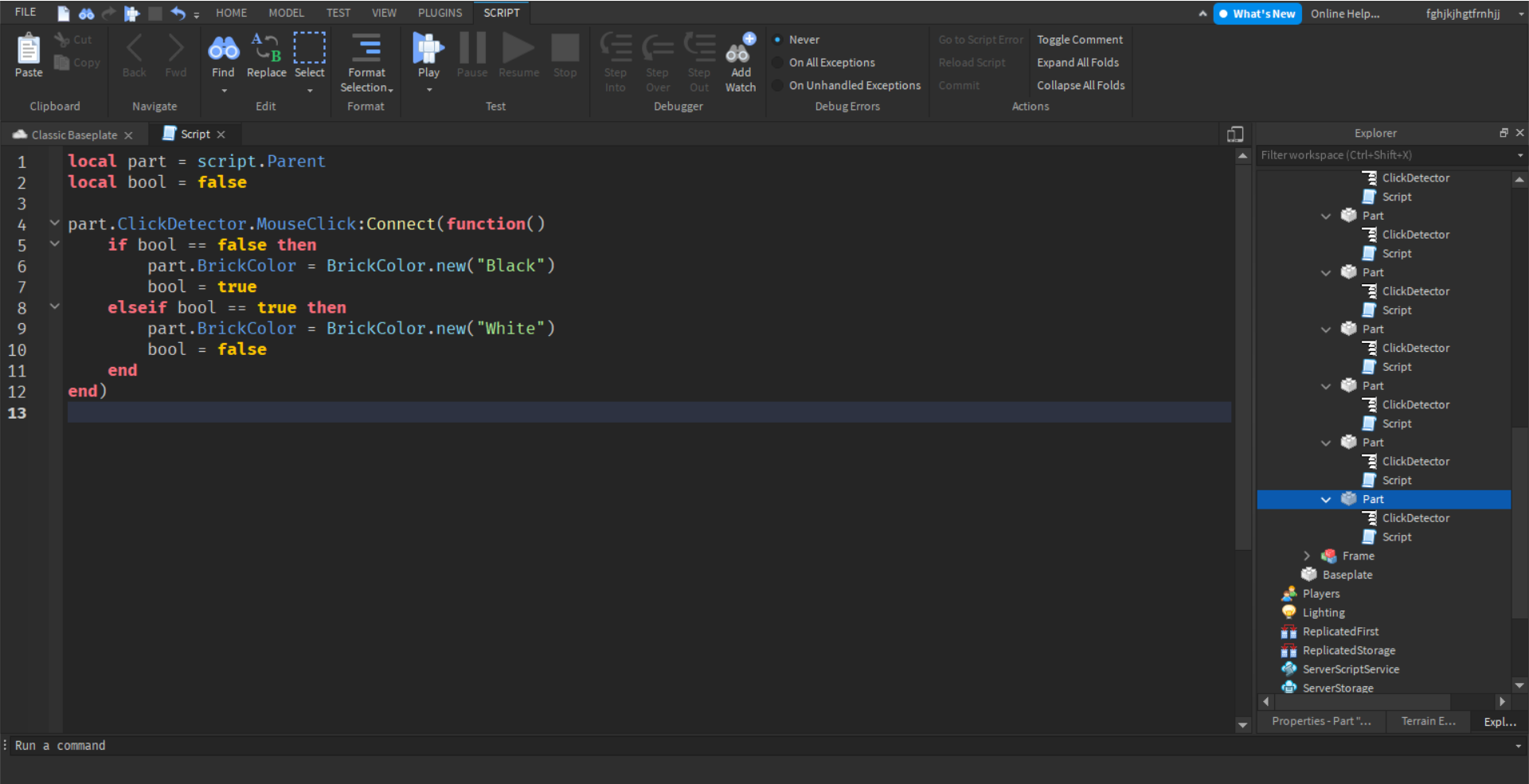
Certainly! Let's imagine a simple script that changes a part's color based on its size. You can place this in a Script inside a Part in Roblox Studio.
local myPart = script.Parent
function updatePartColor()
if myPart.Size.X > 10 then
myPart.BrickColor = BrickColor.new("Really red")
print("Part is large - Red")
elseif myPart.Size.X > 5 then
myPart.BrickColor = BrickColor.new("Bright yellow")
print("Part is medium - Yellow")
else
myPart.BrickColor = BrickColor.new("Bright green")
print("Part is small - Green")
end
end
-- Call the function initially
updatePartColor()
-- You could also connect this to a property changed event to make it dynamic
myPart.Changed:Connect(function(property)
if property == "Size" then
updatePartColor()
end
end)
In this example, if the part's X dimension is greater than 10, it turns red. If not, it checks if it's greater than 5. If that's true, it turns yellow. Otherwise, if neither of those conditions are met, it defaults to green. This demonstrates a clear, sequential decision-making process. For gamers wanting to quickly prototype interactive elements, understanding this structure is a time-saver.
What are Common Pitfalls to Avoid When Using 'elseif'?
Even though 'elseif' simplifies conditional logic, there are a few common traps that even experienced scripters can fall into:
- Incorrect Order of Conditions: This is perhaps the most frequent mistake. Remember, 'elseif' conditions are checked from top to bottom, and the first one that evaluates to true will execute its code block, skipping all subsequent 'elseif' and 'else' blocks. Always place more specific or narrow conditions before broader or more general ones. If you reversed the Size example from earlier (e.g., `if size > 5 then yellow elseif size > 10 then red`), a part with size 12 would turn yellow because `size > 5` would be true first, and the `size > 10` condition would never be reached.
- Logical Gaps or Overlaps: Ensure your conditions cover all necessary possibilities without unintentionally overlapping in ways that lead to incorrect outcomes. While 'elseif' helps with mutual exclusivity, poorly defined conditions can still create gaps where no code executes or unintended overlaps that are hard to debug.
- Forgetting the `end` Keyword: A classic Lua mistake. Every 'if-elseif-else' block must conclude with a single `end` keyword to properly close the statement. Missing it will result in syntax errors.
- Overuse for Non-Mutually Exclusive Conditions: If multiple conditions could be true and you want actions for each true condition, then separate 'if' statements (or a more complex logical structure) might be more appropriate than 'elseif'. 'Elseif' is for when only one path should be taken.
Avoiding these pitfalls saves precious development time, which is especially valuable for those juggling gaming with a busy life schedule.
How Can 'elseif' Enhance Player Experience and Game Dynamics?
'Elseif' statements are crucial for building immersive and responsive Roblox games that adapt to player actions and changing environments, significantly enhancing the overall player experience. Modern gamers, especially the 87% who game regularly and value dynamic interactions, expect their choices to matter.
- Dynamic Difficulty: Imagine a game that adjusts difficulty based on a player's performance. `if playerDeaths > 5 then reduceEnemyHealth() elseif playerKills > 20 then increaseEnemySpawns() end`. This keeps the game challenging but fair, preventing frustration for casual players and boredom for veterans.
- Branching Narratives/Quests: For story-driven games, 'elseif' can manage different quest paths or dialogue options. `if chosenPath == "Mercy" then rewardReputation() elseif chosenPath == "Force" then activateBossFight() end`. This makes players feel their decisions have real consequences, encouraging replayability.
- Interactive Environments: Objects can react differently based on context. `if toolEquipped == "Hammer" then breakWall() elseif toolEquipped == "Key" then unlockDoor() end`.
- Customizable Player Abilities: Different abilities might activate based on current energy levels, cooldowns, or even environmental factors.
By allowing for a multitude of predefined responses, 'elseif' empowers creators to build worlds that feel truly alive and responsive, keeping players engaged and coming back for more, which is the ultimate goal for any Roblox developer. Mobile gaming dominance means these dynamic experiences are accessible to a wider audience than ever.
Are There Advanced Techniques for Using 'elseif' Effectively?
While 'elseif' is straightforward, you can combine it with other Lua concepts for more sophisticated game logic:
- Combining with Logical Operators (`and`, `or`, `not`): You can create highly specific conditions within a single 'if' or 'elseif' by using logical operators. For instance: `if player.Health < 50 and player.Shield > 0 then activateEmergencyShield() elseif player.Health < 20 or player.Mana < 10 then useHealthPotion() end`. This allows for complex evaluations without adding more 'elseif' blocks.
- Using 'elseif' with Enumerations (Enums) or State Machines: For games with distinct states (e.g., "Idle," "Walking," "Attacking"), you can define these states using Enums (custom tables mapping strings to numbers) or simply strings. Then, 'elseif' can control transitions: `if characterState == "Walking" then playWalkAnimation() elseif characterState == "Attacking" then triggerAttackLogic() end`. This creates robust, easy-to-manage state machines for characters or game modes.
- Functions within 'elseif' Blocks: To keep your code clean and modular, encapsulate complex actions within functions and call those functions from your 'elseif' blocks. This enhances readability and makes debugging easier: `if weather == "Rainy" then handleRainEffects() elseif weather == "Sunny" then handleSunEffects() end`. The functions `handleRainEffects()` and `handleSunEffects()` would contain all the specific logic, keeping your 'if-elseif' block concise.
These advanced techniques help manage increasing complexity as your Roblox game grows, a critical consideration for creators looking to build ambitious projects while maintaining a healthy work-life balance.
How Does 'elseif' Relate to Performance in Roblox Scripts?
When it comes to script performance, especially in games that can run on various devices from high-end PCs to mobile phones (where mobile dominance is a clear trend in gaming), every bit of efficiency helps. 'Elseif' statements are generally very efficient in Lua.
The key performance advantage of 'if-elseif-else' over multiple separate 'if' statements lies in its sequential evaluation and early exit. Once a condition within an 'if' or 'elseif' block evaluates to true, Lua executes the corresponding code and then skips all remaining 'elseif' and 'else' conditions in that block. This means unnecessary checks are avoided. In contrast, if you use several independent 'if' statements, the Lua engine would have to evaluate every single 'if' condition, regardless of whether a previous one was true. This can lead to redundant computations and slightly slower script execution, particularly if the conditions involve complex calculations or function calls.
For the vast majority of Roblox games, the performance difference of using 'elseif' versus other conditional structures is negligible unless you're dealing with hundreds or thousands of conditions in a single, frequently-run loop. For busy creators, prioritizing clear, maintainable code with 'elseif' usually provides more significant long-term benefits in development speed and bug reduction than micro-optimizing conditional checks.
What are the Alternatives to 'elseif' for Conditional Logic?
While 'elseif' is incredibly versatile, there are other ways to handle conditional logic in Lua, each with its own advantages:
- Nested 'if' Statements: As discussed, you can nest 'if' statements (an 'if' inside another 'if'). This is suitable for conditions that are truly dependent on a preceding condition, like `if playerIsAlive then if playerHasShield then ... end end`. However, for mutually exclusive conditions, it quickly becomes harder to read and manage than 'elseif'.
- Using a Dictionary (Table) for "Switch-like" Behavior: For a large number of discrete, specific conditions (like choosing an action based on a string name), you can use Lua tables as a lookup mechanism, mimicking a "switch" statement found in other languages.
local actions = {
["attack"] = function() print("Attacking!") end,
["defend"] = function() print("Defending!") end,
["run"] = function() print("Running away!") end
}
local playerAction = "attack"
if actions[playerAction] then
actions[playerAction]()
end
This can be cleaner for many distinct, simple actions.
- Short-Circuit Evaluation with Logical Operators: For very simple two-path decisions, you can sometimes use `and` or `or` for concise expressions, though this is less readable for complex logic: `(condition and actionA()) or actionB()`. This is essentially "if condition then actionA() else actionB()".
- Module Scripts and Object-Oriented Programming (OOP): For highly complex systems, particularly when managing different object types or player classes, more advanced patterns using Module Scripts and OOP principles can abstract conditional logic into more manageable structures. However, for most common conditional needs, 'elseif' remains the most direct and readable solution, especially for gamers looking to build functional experiences without needing a computer science degree.
How Can I Practice and Master 'elseif' for My Roblox Games?
Mastering 'elseif' is all about hands-on practice. It's a skill that builds with experimentation, much like mastering a new game mechanic.
- Start Small: Don't try to build a complex AI with dozens of 'elseif' conditions right away. Begin with simple scenarios: change a part's color based on a number, make a character say different things based on the time of day, or trigger various events when a player interacts with different zones.
- Utilize the Output Window: Use `print()` statements generously within each 'if', 'elseif', and 'else' block to confirm which path your script is taking. This is invaluable for debugging and understanding the flow of your logic.
- Study Existing Code: Look at open-source Roblox games or examples from the Roblox Developer Hub. Observe how experienced developers use 'elseif' in practical scenarios. Can you identify specific conditions and their corresponding actions?
- Challenge Yourself: Think of real-world game situations where you've seen dynamic behavior. How would you implement that using 'if-elseif-else'? For example, how would you create a leaderboard that displays different messages for the top 3 players, and a generic message for others?
- Join the Community: Engage with the Roblox developer forums or Discord servers. Ask questions, share your code for feedback, and learn from others' experiences and solutions. The average US gamer spends over 10 hours a week gaming; dedicating even a fraction of that to practical scripting will yield significant results.
By consistently applying 'elseif' in different contexts, you'll quickly build an intuitive understanding of its power and how to wield it effectively to create truly engaging Roblox experiences.
Frequently Asked Questions About Roblox Scripting Elseif
Is 'elseif' a loop?
No, 'elseif' is part of a conditional statement (`if...then...elseif...then...else...end`) and is used for decision-making, not for repeating blocks of code. Loops like `for` and `while` handle repetition, allowing specific actions to occur multiple times based on conditions or iterations.
Can I have multiple 'elseif' statements?
Yes, you can have any number of 'elseif' statements between your initial 'if' and the final 'else' (which is optional). This allows for a chain of multiple distinct conditions, providing a structured way to handle complex decision trees within a single logical block, greatly improving code readability.
Does the order of 'elseif' conditions matter?
Absolutely. Lua evaluates conditions from top to bottom. Once an 'if' or 'elseif' condition is met, its code block executes, and the rest of the 'elseif' and 'else' conditions in that block are skipped. Therefore, always place more specific conditions before more general ones to ensure the correct logic is applied.
What if no 'if' or 'elseif' condition is true?
If no 'if' or 'elseif' condition evaluates to true, the code block under the optional 'else' statement will execute. If there's no 'else' block present in the structure, the entire conditional statement is simply skipped, and the script continues to the next line of code after the `end` keyword.
Is 'elseif' unique to Lua in Roblox?
The 'elseif' keyword is common in many programming languages for handling multiple conditions, though the exact syntax might vary (e.g., `elif` in Python, `else if` in JavaScript/C++). Its underlying logical purpose, to provide alternative conditions after an initial `if` fails, is a universal concept in programming for structured decision-making.
How does 'elseif' help with game difficulty?
'Elseif' allows you to dynamically adjust game difficulty based on player score, progress, or other in-game metrics. For example, `if score < 100 then easy elseif score < 500 then medium else hard end` could modify enemy strength or resource availability, providing a tailored challenge that keeps players engaged without being overly frustrated or bored.
Mastering 'elseif' statements in Roblox scripting is more than just learning another piece of code; it's about unlocking the potential for dynamic, responsive, and truly engaging game experiences. For us gamers who juggle so much, efficiency and impact are key, and 'elseif' delivers on both. By clearly defining multiple conditions, you can craft intricate interactions that make your creations stand out, all while maintaining readable and manageable code. It's a powerful tool that transforms basic scripts into intelligent systems, allowing your game worlds to react uniquely to player actions and changing circumstances. Keep experimenting, keep building, and remember that every line of code you write brings your vision closer to reality. What's your biggest scripting challenge you hope 'elseif' can solve? Comment below!
Mastering conditional logic for dynamic game events, efficient script writing with elseif, essential for Roblox game developers, problem-solving in Lua, creating engaging player interactions, optimizing script performance.
35


Elseif Embedded If Statements Beginner Roblox Scripting 12 YouTube . IF ELSE ELSEIF Statements Roblox Studio Scripting YouTube . Why Do My Elseif Is Invalid Again Scripting Support Developer Forum . How To Script In Roblox In 2022 Beginner Tutorial Part 6 Else . Roblox How To Script For Beginners 5 If Elseif Else YouTube





If Else Roblox Studio Roblox Game Dev . How To Script In Roblox Studio Elseif Else 7 YouTube . What Is Roblox Terumi Script And Its Role In Gaming Como Usar Scripts En Roblox Studio . How To Use Module Scripts For EVERYTHING In Roblox Studio YouTube . Get Started Scripting In Roblox Studio Roblox Studio For Beginners


NEW How To Use Roblox Scripts TUTORIAL YouTube . Roblox Scripting Tutorial 3 If Else ElseIf YouTube . Beginner S Roblox Scripting Tutorial 9 Else Elseif Statements . Help With This If Statement Scripting Support Developer Forum Roblox . Why Is The Elseif Statement Not Working Scripting Support Developer


Basic Scripting Roblox Studio Scripting Guide PART 1 Tutorial . An Intelligent Script Editor Scripting . The BEST Beginner Guide To SCRIPTING In Roblox Part 3 Roblox Studio Hqdefault . Script Roblox Wiki Fandom Latest. The Ultimate Guide To Scripting On Roblox 2026 Approved YouTube




Script Application Roblox Coding Guide To Master Roblox Script 2 . Contoh Roblox Scripts 2026 Panduan Lengkap Untuk Pemula Jurnal Ngawi 3789630207 . 8 Best Roblox Scripting Courses For 2026 Free Paid Class Central BCG Robolox Banner . Script Application Roblox Coding Guide To Master Roblox Learn Roblox Scripting Web Copy . Roblox Lua Scripting Basics For Beginners CodaKid Roblox Lua





Roblox Scripting Tutorial For Beginners 2026 1 Printing Output . Roblox Studio Scripting Basics Mastering Loops TikTok Img. A60 Roblox What Is This Trending Script You Hear About NoFilter. How To Message On Roblox 2026 A Quick Guide . How To Message On Roblox 2026 A Quick Guide SL1500



Best AI For Roblox Scripting In 2026 Top Tools Ranked Obby Obby Best Ai For Roblox Scripting Hero.webp. Elseif Doesnt Work Scripting Support Developer Forum Roblox . Roblox Lua If Statements If Statements Roblox Beginners Scripting Sddefault . Script Roblox Studio EP 5 If Elseif Else . Escuela De Script Ep 6 If Elseif Y Else ROBLOX STUDIO Hqdefault